
這裡介紹如何從電腦中找出 Windows 或 Office 的產品金鑰,讓重灌電腦時不必煩惱找不到序號。
Windows 用久了難免需要重灌,而安裝 Windows 與 Office 時都會需要輸入產品序號,但是如果序號不見了,就很令人頭痛了。
雖然我們可以用登錄編輯程式(regedit.exe)來從登錄檔找出產品序號(路徑為 HKEY_LOCAL_MACHINESoftwareMicrosoftWindowsNTCurrent VersionDigitalProductId):
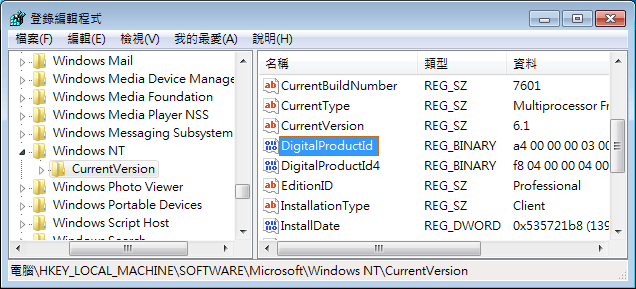
不過因為在登錄檔中所儲存的序號都是二進位的形式,不容易看出真正的序號,以下介紹幾種可以解讀序號的方式。
使用 VBScript 讀取 Windows 序號
我們可以用 VBScript 撰寫一個讀取序號的指令稿,這樣的方式完全不需要下載與安裝任何軟體。將下面這段程式碼複製起來,儲存成一個 .vbs 檔(如 getkey.vbs):
Set WshShell = CreateObject("WScript.Shell")
MsgBox ConvertToKey(WshShell.RegRead("HKLMSOFTWAREMicrosoftWindows NTCurrentVersionDigitalProductId"))

Function ConvertToKey(Key)
Const KeyOffset = 52
i = 28
Chars = "BCDFGHJKMPQRTVWXY2346789"
Do
Cur = 0
x = 14
Do
Cur = Cur * 256
Cur = Key(x + KeyOffset) + Cur
Key(x + KeyOffset) = (Cur  24) And 255
Cur = Cur Mod 24
x = x -1
Loop While x >= 0
i = i -1
KeyOutput = Mid(Chars, Cur + 1, 1) & KeyOutput
If (((29 - i) Mod 6) = 0) And (i <> -1) Then
i = i -1
KeyOutput = "-" & KeyOutput
End If
Loop While i >= 0
ConvertToKey = KeyOutput
End Function
建議將這個 getkey.vbs 檔案儲存在桌面上,然後用滑鼠點兩下執行,就會出現自己 Windows 的序號了。
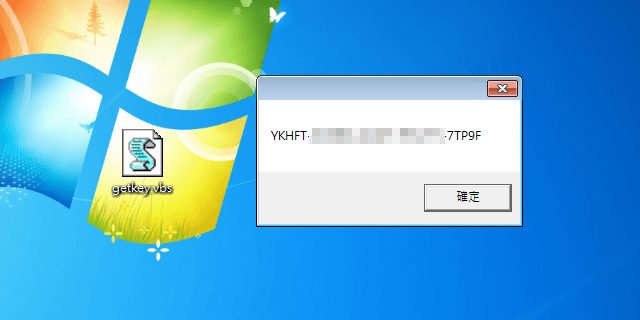
在這個顯示序號的視窗上按下 Ctrl + c 就可以直接複製這組序號。
使用 VBScript 讀取 Office 序號
這是適用於 Windows 7、Windows 10 與 Office 2010 – 2013 的指令稿:
Const HKLM = &H80000002

wscript.echo "View Product Keys | Microsoft Products" & vbCrLf

'Install Date
Computer = "."
Set objWMIService = GetObject("winmgmts:" & Computer & "rootcimv2")
Set Obj = objWMIService.ExecQuery ("Select * from Win32_OperatingSystem")

dim InsDate

For Each item in Obj
  InsDate = item.InstallDate
  ' Gather Operating System Information
  Caption = Item.Caption
  OSArchitecture = Item.OSArchitecture
  CSDVersion = Item.CSDVersion
  Version = Item.Version
  Next

dim NewDate

NewDate = mid(InsDate,9,2) & ":" & mid(InsDate,11,2) & ":" & mid(InsDate,13,2)
NewDate = NewDate & " " & mid(InsDate,7,2) & "/" & mid(InsDate,5,2) & "/" & mid(InsDate,1,4)

QueryWindowsProductKeys()

wscript.echo 'vbCrLf & "Office Keys" & vbCrLf

QueryOfficeProductKeys()

Function DecodeProductKey(arrKey, intKeyOffset)
  If Not IsArray(arrKey) Then Exit Function
    intIsWin8 = BitShiftRight(arrKey(intKeyOffset + 14),3) And 1
    arrKey(intKeyOffset + 14) = arrKey(intKeyOffset + 14) And 247 Or BitShiftLeft(intIsWin8 And 2,2)
    i = 24
    strChars = "BCDFGHJKMPQRTVWXY2346789"
    strKeyOutput = ""
    While i > -1
        intCur = 0
        intX = 14
        While intX > -1
            intCur = BitShiftLeft(intCur,8)
            intCur = arrKey(intX + intKeyOffset) + intCur
            arrKey(intX + intKeyOffset) = Int(intCur / 24)
            intCur = intCur Mod 24
            intX = intX - 1
        Wend
        i = i - 1
        strKeyOutput = Mid(strChars,intCur + 1,1) & strKeyOutput
        intLast = intCur
    Wend
    If intIsWin8 = 1 Then
        strKeyOutput = Mid(strKeyOutput,2,intLast) & "N" & Right(strKeyOutput,Len(strKeyOutput) - (intLast + 1))
    End If
    strKeyGUIDOutput = Mid(strKeyOutput,1,5) & "-" & Mid(strKeyOutput,6,5) & "-" & Mid(strKeyOutput,11,5) & "-" & Mid(strKeyOutput,16,5) & "-" & Mid(strKeyOutput,21,5)
    DecodeProductKey = strKeyGUIDOutput
End Function

Function RegReadBinary(strRegPath,strRegValue)
    Set objReg = GetObject("winmgmts:{impersonationLevel=impersonate}!.rootdefault:StdRegProv")
    objReg.GetBinaryValue HKLM,strRegPath,strRegValue,arrRegBinaryData
    RegReadBinary = arrRegBinaryData
    Set objReg = Nothing
End Function

Function BitShiftLeft(intValue,intShift)
    BitShiftLeft = intValue * 2 ^ intShift
End Function

Function BitShiftRight(intValue,intShift)
    BitShiftRight = Int(intValue / (2 ^ intShift))
End Function

Function QueryOfficeProductKeys()

        strBaseKey = "SOFTWARE"

        strOfficeKey = strBaseKey & "MicrosoftOffice"
        Set objReg = GetObject("winmgmts:{impersonationLevel=impersonate}!.rootdefault:StdRegProv")
        objReg.EnumKey HKLM, strOfficeKey, arrOfficeVersionSubKeys
        intProductCount = 1
        If IsArray(arrOfficeVersionSubKeys) Then

            For Each strOfficeVersionKey In arrOfficeVersionSubKeys

                Select Case strOfficeVersionKey
                    Case "11.0"
                        CheckOfficeKey strOfficeKey & "11.0Registration",52,intProductCount
                    Case "12.0"
                        CheckOfficeKey strOfficeKey & "12.0Registration",52,intProductCount
                    Case "14.0"
                        CheckOfficeKey strOfficeKey & "14.0Registration",808,intProductCount
                    Case "15.0"
                        CheckOfficeKey strOfficeKey & "15.0Registration",808,intProductCount
                End Select
            Next
        End If

        strBaseKey = "SOFTWAREWow6432Node"

        strOfficeKey = strBaseKey & "MicrosoftOffice"
        Set objReg = GetObject("winmgmts:{impersonationLevel=impersonate}!.rootdefault:StdRegProv")
        objReg.EnumKey HKLM, strOfficeKey, arrOfficeVersionSubKeys
        intProductCount = 1

        If IsArray(arrOfficeVersionSubKeys) Then

            For Each strOfficeVersionKey In arrOfficeVersionSubKeys

                Select Case strOfficeVersionKey
                    Case "11.0"
                        CheckOfficeKey strOfficeKey & "11.0Registration",52,intProductCount
                    Case "12.0"
                        CheckOfficeKey strOfficeKey & "12.0Registration",52,intProductCount
                    Case "14.0"
                        CheckOfficeKey strOfficeKey & "14.0Registration",808,intProductCount
                    Case "15.0"
                        CheckOfficeKey strOfficeKey & "15.0Registration",808,intProductCount
                End Select
            Next
        End If
End Function

'Office Product Key
Sub CheckOfficeKey(strRegPath,intKeyOffset,intProductCount)

    Set objReg = GetObject("winmgmts:{impersonationLevel=impersonate}!.rootdefault:StdRegProv")
    objReg.EnumKey HKLM, strRegPath, arrOfficeRegistrations
    If IsArray(arrOfficeRegistrations) Then
        For Each strOfficeRegistration In arrOfficeRegistrations

            objReg.GetStringValue HKLM,strRegPath & "" & strOfficeRegistration,"ConvertToEdition",strOfficeEdition
            objReg.GetBinaryValue HKLM,strRegPath & "" & strOfficeRegistration,"DigitalProductID",arrProductID
            If strOfficeEdition <> "" And IsArray(arrProductID) Then
                WriteData "Product", strOfficeEdition
                WriteData "Key", DecodeProductKey(arrProductID,intKeyOffset) & vbCrLf
                intProductCount = intProductCount + 1
            End If
        Next
    End If
End Sub

'Windows Product Key
Sub QueryWindowsProductKeys()
    strWinKey = CheckWindowsKey("SOFTWAREMicrosoftWindows NTCurrentVersion","DigitalProductId",52)
    If strWinKey <> "" Then
        wscript.echo "Product: " & Caption & Version & " (" & OSArchitecture & ")"
        wscript.echo "Installation Date: " & NewDate
        WriteData "Key", strWinKey
        Exit Sub
    End If
    strWinKey = CheckWindowsKey("SOFTWAREMicrosoftWindows NTCurrentVersion","DigitalProductId4",808)
    If strWinKey <> "" Then
        wscript.echo "Product: " & Caption & Version & " (" & OSArchitecture & ")"
        wscript.echo "Installation Date: " & NewDate
        WriteData "Key", strWinKey
        Exit Sub
    End If
    strWinKey = CheckWindowsKey("SOFTWAREMicrosoftWindows NTCurrentVersionDefaultProductKey","DigitalProductId",52)
    If strWinKey <> "" Then
        wscript.echo "Product: " & Caption & Version & " (" & OSArchitecture & ")"
        wscript.echo "Installation Date: " & NewDate
        WriteData "Key", strWinKey
        Exit Sub
    End If
    strWinKey = CheckWindowsKey("SOFTWAREMicrosoftWindows NTCurrentVersionDefaultProductKey","DigitalProductId4",808)
    If strWinKey <> "" Then
        wscript.echo "Product: " & Caption & Version & " (" & OSArchitecture & ")"
        wscript.echo "Installation Date: " & NewDate
        WriteData "Key", strWinKey
        Exit Sub
    End If
End Sub

Function CheckWindowsKey(strRegPath,strRegValue,intKeyOffset)
    strWinKey = DecodeProductKey(RegReadBinary(strRegPath,strRegValue),intKeyOffset)
    If strWinKey <> "BBBBB-BBBBB-BBBBB-BBBBB-BBBBB" And strWinKey <> "" Then
        CheckWindowsKey = strWinKey
    Else
        CheckWindowsKey = ""
    End If
End Function

Function RegReadBinary(strRegPath,strRegValue)
    Set objReg = GetObject("winmgmts:{impersonationLevel=impersonate}!.rootdefault:StdRegProv")
    objReg.GetBinaryValue HKLM,strRegPath,strRegValue,arrRegBinaryData
    RegReadBinary = arrRegBinaryData
    Set objReg = Nothing
End Function

Function OsArch()
    Set objShell = WScript.CreateObject("WScript.Shell")
    If objShell.ExpandEnvironmentStrings("%ProgramFiles(x86)%") = "%ProgramFiles(x86)%" Then
        OsArch = "x86"
    Else
        OsArch = "x64"
    End If
    Set objShell = Nothing
End Function

Sub WriteData(strProperty,strValue)

    WScript.Echo strProperty & ": " & Trim(strValue)

    'Set objShell = CreateObject("WScript.Shell")
    'strKey = "HKLMSOFTWARECentraStageCustom" & strProperty
    'objShell.RegWrite strKey,Trim(strValue),"REG_SZ"
    'Set objShell = Nothing

End Sub
ProduKey
NirSoft 所提供的 ProduKey 是一個很好用的免費小工具,它可以將系統中的 Windows 與 Office 序號一次都抓取出來,非常方便,不過缺點是有些防毒軟體會將這個工具判斷為惡意程式,因為它會竊取您的序號。
名稱:ProduKey
網址:www.nirsoft.net
從 NirSoft 網站上將 ProduKey 的壓縮檔下載回來,解壓縮之後直接就可以使用,不需要安裝。
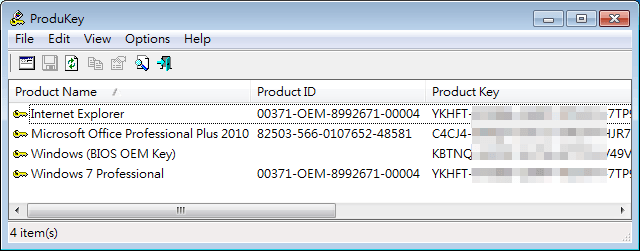
ProduKey 除了可以取得目前系統的序號之外,也可以從其他的資料來源中尋找序號。
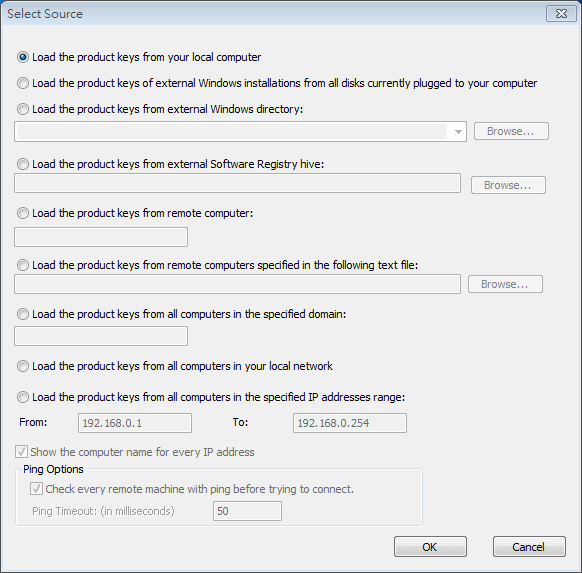
這個工具也非常實用,假設我們的 Windows 系統出了問題,無法正常開機的時候,我們就可以直接把硬碟拔下來,插在另外一台正常的電腦上,用這個工具將出問題系統的序號取出來。