這裡介紹 Excel VBA 的時間變數與相關函數的用法,並且提供許多實用的參考範例。
日期與時間是一種比較特別,但是也時常會被使用到的資料類型,在 VBA 中我們可以使用 Date 這種特殊的變數類型來儲存日期與時間的資料,同時 VBA 中也內建了許多用來處理日期與時間的工具函數,以下是在 VBA 的使用日期與時間相關變數與函數的教學。
初始化日期與時間
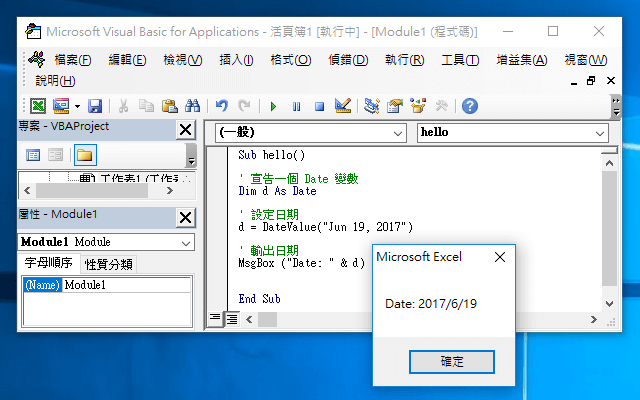
VBA 的 Date 變數是一種專門用來儲存日期與時間的變數,我們可以使用 DateValue 來設定日期:
' 宣告一個 Date 變數
Dim d As Date

' 設定日期
d = DateValue("Jun 19, 2017")

' 輸出日期
MsgBox ("Date: " & d)
DateValue 可接受的日期格式有好多種,以下是一些常見的格式範例:
' 各種設定日期的方式
d = DateValue("2017/01/19")
d = DateValue("2017-01-19")
d = DateValue("19-JAN")
d = DateValue("19-JAN-2017")
d = DateValue("01/19/2017")
也可以直接用一般的字串直接指定:
d = "Jun 19, 2017"
DateSerial 可以接受數值的年、月、日,建立日期變數:
Dim d As Date
d = DateSerial(2016, 5, 10)
MsgBox (d)
時間的設定則可使用 TimeValue 與 TimeSerial 函數:
Dim t As Date
t = TimeValue("20:15")
MsgBox (t)

t = TimeSerial(20, 15, 20)
MsgBox (t)
CDate 函數可以初始化日期與時間:
Dim d As Date

' 設定日期與時間
d = CDate("15/08/2013 8:25:00 PM")
MsgBox (d)
或是使用一般的字串也可以:
' 設定日期與時間
d = "15/08/2013 8:25:00 PM"
MsgBox (d)
現在日期與時間
Date 函數可以取得系統上現在的日期,Time 函數會傳回系統目前的時間,而 Now 函數則會傳回系統上目前的日期與時間:
Dim d As Date

' 現在日期
d = Date
MsgBox ("現在是:" & d)

' 現在時間
d = Time()
MsgBox ("現在是:" & d)

' 現在日期與時間
d = Now()
MsgBox ("現在是:" & d)
Timer 函數可以傳回從當天 12:00 AM 到目前的秒數,精確度可以到千分之一秒:
MsgBox ("Timer is: " & Timer())
判斷是否為日期與時間
IsDate 函數可以判斷輸入的資料是否為合法的日期或時間:
' True
MsgBox (IsDate("2017/5/21"))

' False
MsgBox (IsDate("123456789"))
日期與時間的運算
DateAdd 可以計算日期或時間的加法運算,算出某段時間之後的時間點:
Dim d As Date

d = "01-Jan-2013"
MsgBox ("一年後:" & DateAdd("yyyy", 1, d))
MsgBox ("一季後:" & DateAdd("q", 1, d))
MsgBox ("一月後:" & DateAdd("m", 1, d))
MsgBox ("一天後:" & DateAdd("d", 1, d))
MsgBox ("一週後:" & DateAdd("ww", 1, d))

d = "01-Jan-2013 12:00:00"
MsgBox ("一小時後:" & DateAdd("h", 1, d))
MsgBox ("一分鐘後:" & DateAdd("n", 1, d))
MsgBox ("一秒鐘後:" & DateAdd("s", 1, d))
以加法配合負數,即可進行日期與時間的減法運算,算出某段時間之前的時間點:
Dim d As Date

d = "01-Jan-2013"
MsgBox ("一年前:" & DateAdd("yyyy", -1, d))
MsgBox ("一季前:" & DateAdd("q", -1, d))
MsgBox ("一月前:" & DateAdd("m", -1, d))
MsgBox ("一天前:" & DateAdd("d", -1, d))
MsgBox ("一週前:" & DateAdd("ww", -1, d))

d = "01-Jan-2013 12:00:00"
MsgBox ("一小時前:" & DateAdd("h", -1, d))
MsgBox ("一分鐘前:" & DateAdd("n", -1, d))
MsgBox ("一秒鐘前:" & DateAdd("s", -1, d))
如果要計算兩個時間點之間的時間間隔,可以使用 DateDiff 函數:
Dim d1, d2 As Date
d1 = "2017/10/02"
d2 = "2018/11/14"

MsgBox ("相差年: " & DateDiff("yyyy", d1, d2))
MsgBox ("相差季: " & DateDiff("q", d1, d2))
MsgBox ("相差月: " & DateDiff("m", d1, d2))
MsgBox ("相差日: " & DateDiff("d", d1, d2))
MsgBox ("相差週: " & DateDiff("ww", d1, d2))

d1 = "01-Jan-09 00:00:00"
d2 = "01-Jan-10 23:59:00"
MsgBox ("相差小時: " & DateDiff("h", d1, d2))
MsgBox ("相差分鐘: " & DateDiff("n", d1, d2))
MsgBox ("相差秒鐘 : " & DateDiff("s", d1, d2))
日期與時間的輸出
取出部分日期或時間
我們可以使用 Year、Month、Day 與 Weekday 來判斷日期的年、月、日與星期幾:
Dim d As Date
d = Date

' 取出年、月、日、星期
MsgBox ("年: " & Year(d))
MsgBox ("月: " & Month(d))
MsgBox ("日: " & Day(d))
MsgBox ("星期: " & Weekday(d))
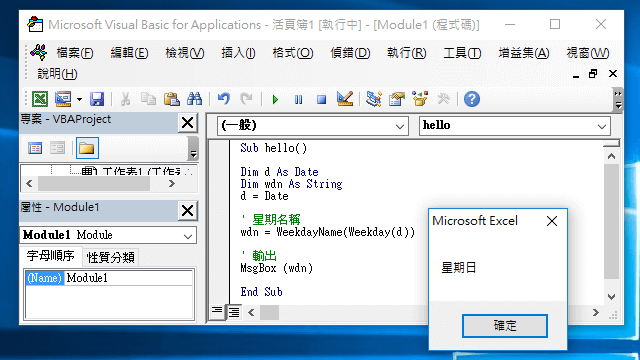
Weekday 預設會傳回 1 到 7 的整數,分別代表星期日到星期六,如果要取得星期名稱,可再使用 WeekdayName 轉換:
Dim d As Date
Dim wdn As String
d = Date

' 星期名稱
wdn = WeekdayName(Weekday(d))

' 輸出
MsgBox (wdn)
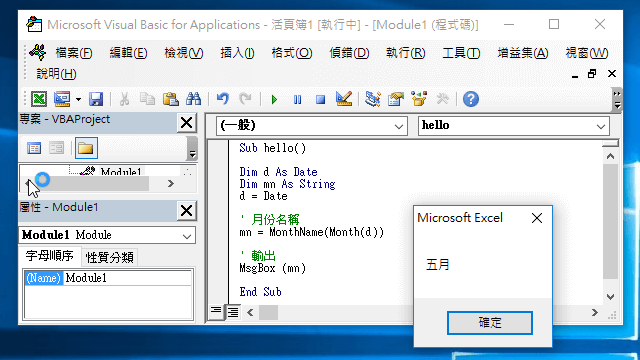
月份名稱也是用類似的方式,使用 MonthName 函數轉換:
Dim d As Date
Dim mn As String
d = Date

' 月份名稱
mn = MonthName(Month(d))

' 輸出
MsgBox (mn)
時間的部分可以使用 Hour、Minute 與 Second,用法也都類似:
MsgBox ("時:" & Hour(Now))
MsgBox ("分:" & Minute(Now))
MsgBox ("秒:" & Second(Now))
DatePart 是一個可以依照指定的樣板輸出日期各個部份的多功能函數:
MsgBox ("年:" & DatePart("yyyy", Now))
MsgBox ("月:" & DatePart("m", Now))
MsgBox ("日:" & DatePart("d", Now))
MsgBox ("星期:" & DatePart("w", Now))
MsgBox ("週數:" & DatePart("ww", Now))
MsgBox ("季:" & DatePart("q", Now))
MsgBox ("時:" & DatePart("h", Now))
MsgBox ("分:" & DatePart("n", Now))
MsgBox ("秒:" & DatePart("s", Now))
輸出格式
FormatDateTime 可依據指定的格式輸出日期與時間,可用的輸出格式如下:
| 格式代碼 | 說明 |
|---|---|
0 或 vbGeneralDate | 完整格式(預設值) |
1 或 vbLongDate | 完整日期 |
2 或 vbShortDate | 簡短日期 |
3 或 vbLongTime | 完整時間 |
4 或 vbShortTime | 簡短時間 |
以下是各種使用範例:
Dim d As Date
d = ("2013-08-15 20:25")

' 2013/8/15 下午 08:25:00
MsgBox (FormatDateTime(d))
MsgBox (FormatDateTime(d, 0))
MsgBox (FormatDateTime(d, vbGeneralDate))

' 2013年8月15日
MsgBox (FormatDateTime(d, 1))
MsgBox (FormatDateTime(d, vbLongDate))

' 2013/8/15
MsgBox (FormatDateTime(d, 2))
MsgBox (FormatDateTime(d, vbShortDate))

' 下午 08:25:00
MsgBox (FormatDateTime(d, 3))
MsgBox (FormatDateTime(d, vbLongTime))

' 20:25
MsgBox (FormatDateTime(d, 4))
MsgBox (FormatDateTime(d, vbShortTime))